Drifters module - demo#
pynsitu.drifters implements methods useful to the cleaning and processing of drifter trajectories.
Drifter data is assumed to be contained within a pandas dataframe with with a least the following columns: time, longitude, latitude. A column may also described the drifter id.
import xarray as xr
import pandas as pd
import numpy as np

import matplotlib.pyplot as plt

import pynsitu as pin
generate synthetic drifter trajectories#
def generate_one_trajectory(
    u_mean=-0.1, v_mean=0, u_wave=0.1, noise=0.05, dr_id="dr0", end="2018-02-01"
):

    freq = "1H"

    time_unit = pd.Timedelta("1s")
    dt = pd.Timedelta(freq) / time_unit
    time = pd.date_range(start="2018-01-01", end=end, freq=freq)
    _time = (time - time[0]) / time_unit

    lon0, lat0 = -20, 30
    scale_lat = 111e3
    scale_lon = scale_lat * np.cos(lat0 * pin.deg2rad)
    T = pd.Timedelta("1D") / time_unit

    u = (
        u_mean
        + u_wave * np.cos(2 * np.pi * _time / T)
        + np.random.randn(time.size) * noise
    )
    v = (
        v_mean
        + u_wave * np.sin(2 * np.pi * _time / T)
        + np.random.randn(time.size) * noise
    )

    lon = lon0 + np.cumsum(u) * dt / scale_lon
    lat = lat0 + np.cumsum(v) * dt / scale_lat
    # lon = u
    # lat = v

    df = pd.DataFrame(dict(lon=lon, lat=lat, time=time, u=u, v=v))
    df["id"] = dr_id
    df = df.set_index("time")

    return df
# actually generate one time series
df = generate_one_trajectory()
df.head()
| lon | lat | u | v | id | |
|---|---|---|---|---|---|
| time | |||||
| 2018-01-01 00:00:00 | -20.000788 | 29.999491 | -0.021034 | -0.015686 | dr0 |
| 2018-01-01 01:00:00 | -20.001118 | 29.998477 | -0.008826 | -0.031258 | dr0 |
| 2018-01-01 02:00:00 | -19.997529 | 29.999040 | 0.095854 | 0.017331 | dr0 |
| 2018-01-01 03:00:00 | -20.000823 | 30.002137 | -0.087982 | 0.095500 | dr0 |
| 2018-01-01 04:00:00 | -20.004857 | 30.005824 | -0.107715 | 0.113700 | dr0 |
basic plots to inspect data#
May be useful to clean up drifter time series
phv, coords = df.geo.plot_on_map()
phv
compute velocities#
Multiple methods are employed to compute velocities, see compute_velocities doc and code.
Some involve projecting data which results in local cartesian coordinates x and y.
df.geo.compute_velocities(inplace=True)
df.head()
| lon | lat | u | v | id | x | y | velocity_east | velocity_north | velocity | |
|---|---|---|---|---|---|---|---|---|---|---|
| time | ||||||||||
| 2018-01-01 00:00:00 | -20.000788 | 29.999491 | -0.021034 | -0.015686 | dr0 | 133960.361743 | 1031.830412 | -0.113929 | -0.079742 | 0.139063 |
| 2018-01-01 01:00:00 | -20.001118 | 29.998477 | -0.008826 | -0.031258 | dr0 | 133929.833767 | 919.064918 | 0.043676 | -0.006953 | 0.044226 |
| 2018-01-01 02:00:00 | -19.997529 | 29.999040 | 0.095854 | 0.017331 | dr0 | 134275.412685 | 985.574663 | 0.003952 | 0.056342 | 0.056480 |
| 2018-01-01 03:00:00 | -20.000823 | 30.002137 | -0.087982 | 0.095500 | dr0 | 133953.359341 | 1325.061218 | -0.098208 | 0.104462 | 0.143378 |
| 2018-01-01 04:00:00 | -20.004857 | 30.005824 | -0.107715 | 0.113700 | dr0 | 133559.241127 | 1729.127419 | -0.115983 | 0.087820 | 0.145480 |
phv, coords = df.geo.plot_on_map(s=10, c="velocity", clim=(0, 0.3), cmap="magma")
phv
compare different methods to compute velocities#
df_sp = df.geo.compute_velocities(distance="spectral", inplace=False)
df_xy = df.geo.compute_velocities(distance="xy", inplace=False)
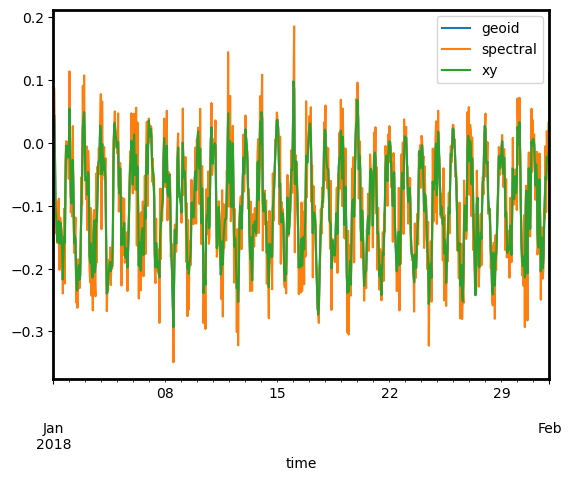
df["velocity_east"].plot(label="geoid")
df_sp["velocity_east"].plot(label="spectral")
df_xy["velocity_east"].plot(label="xy")
plt.legend()
<matplotlib.legend.Legend at 0x1367f8cd0>
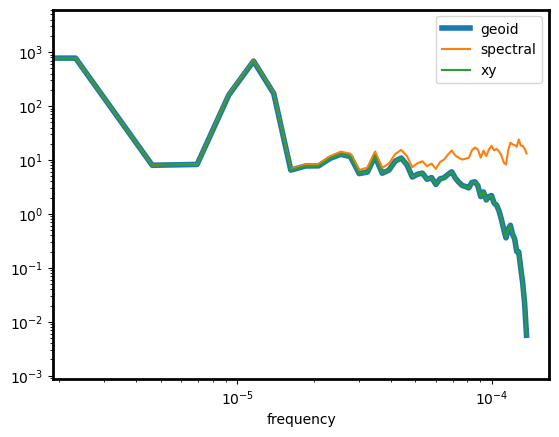
kwargs = dict(include=["velocity_east"], nperseg=24 * 5, detrend=False)
E = df.ts.spectrum(**kwargs)
E_sp = df_sp.ts.spectrum(**kwargs)
E_xy = df_xy.ts.spectrum(**kwargs)
# spectrum comparison
ax = E["velocity_east"].rename("geoid").plot(lw=4)
E_sp["velocity_east"].rename("spectral").plot(ax=ax)
E_xy["velocity_east"].rename("xy").plot(ax=ax)
ax.set_yscale("log")
ax.set_xscale("log")
ax.legend()
<matplotlib.legend.Legend at 0x136bca170>
concatenate multiple trajectories and manipulate#
ids = [0, 1, 2]
u_wave = [0, 0.1, 0.2]
dfm = (
    pd.concat(
        [
            generate_one_trajectory(
                u_mean=-0.1, v_mean=0, u_wave=uw, noise=0.05, dr_id=f"dr{i}"
            )
            for i, uw in zip(ids, u_wave)
        ]
    )
    .reset_index()
    .set_index("id")
)

# get all drifter ids
ids = list(dfm.index.unique())

dfm.head()
| time | lon | lat | u | v | |
|---|---|---|---|---|---|
| id | |||||
| dr0 | 2018-01-01 00:00:00 | -20.001938 | 30.001574 | -0.051755 | 0.048540 |
| dr0 | 2018-01-01 01:00:00 | -20.003740 | 29.999217 | -0.048114 | -0.072674 |
| dr0 | 2018-01-01 02:00:00 | -20.007893 | 29.998033 | -0.110882 | -0.036504 |
| dr0 | 2018-01-01 03:00:00 | -20.014289 | 29.997121 | -0.170800 | -0.028130 |
| dr0 | 2018-01-01 04:00:00 | -20.018838 | 29.996461 | -0.121469 | -0.020351 |
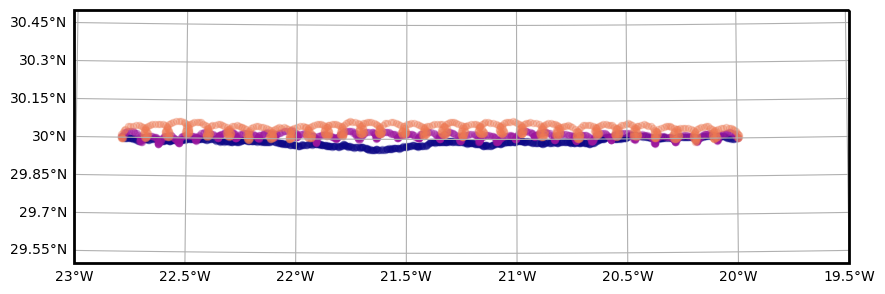
fig, ax, _ = pin.maps.plot_map(extent=[-23.0, -19.5, 29.5, 30.5])

colors = pin.get_cmap_colors(len(ids))

for i, c in zip(ids, colors):
    dfm.loc[i].plot.scatter(
        ax=ax, x="lon", y="lat", c=c, alpha=0.3, transform=pin.maps.crs
    )
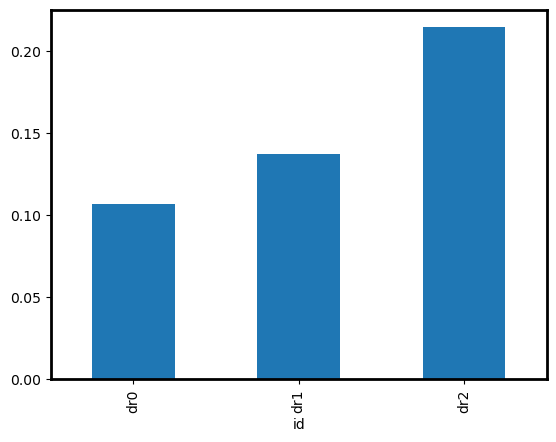
Compute velocities and averaged energy per drifter
dfm_vel = (
    dfm.groupby("id")
    .apply(lambda df: df.set_index("time").geo.compute_velocities().reset_index())
    .droplevel(1)
)
dfm_vel.groupby("id")["velocity"].mean().plot.bar()
<Axes: xlabel='id'>
compute temporal window averaged diagnostics (spectra, autocorrelations)#
When manipulating drifter time series one may need to divide the timeseries into chunks (“windows”) and performs diagnostics on each chunk separately before combining results. This may typically be the case for spectral or autocorrelation diagnostics.
df = generate_one_trajectory(dr_id="dr0", end="2018-04-01")
def compute_periodogram(df, **kwargs):
    df["U"] = df["u"] + 1j * df["v"]
    return df.ts.spectrum(method="periodogram", unit="1D", include=["U"], **kwargs)["U"]


P = pin.drifters.time_window_processing(
    df,
    compute_periodogram,
    "10D",
    geo=True,
    detrend="linear",
)
P = P.reset_index()
# assembles as an xarray dataset
coords = ["time", "lon", "lat", "id"]
P_stacked = (
    P.drop(columns=coords)
    .stack()
    .to_xarray()
    .rename(level_0="index", level_1="frequency")
    .rename("uv")
)
P_stacked["frequency"] = P_stacked["frequency"].astype(float)
P_xr = xr.merge(
    [
        P[coords].to_xarray(),
        P_stacked,
    ]
)
P_xr
<xarray.Dataset>
Dimensions:    (index: 16, frequency: 2161)
Coordinates:
  * index      (index) int64 0 1 2 3 4 5 6 7 8 9 10 11 12 13 14 15
  * frequency  (frequency) float64 -11.99 -11.98 -11.97 ... 11.97 11.98 11.99
Data variables:
    time       (index) datetime64[ns] 2018-01-06 2018-01-11 ... 2018-03-22
    lon        (index) float64 -20.5 -20.95 -21.39 ... -26.25 -26.7 -27.13
    lat        (index) float64 29.99 29.97 29.96 29.94 ... 29.86 29.86 29.87
    id         (index) object 'dr0' 'dr0' 'dr0' 'dr0' ... 'dr0' 'dr0' 'dr0'
uv (index, frequency) float64 0.0002499 5.11e-05 ... 0.0003054One performs next an averaged conditionned on time, lon, lat, and/or id.
This averaging can be performed from the pandas Dataframe P or the xarrat Dataset P_xr.
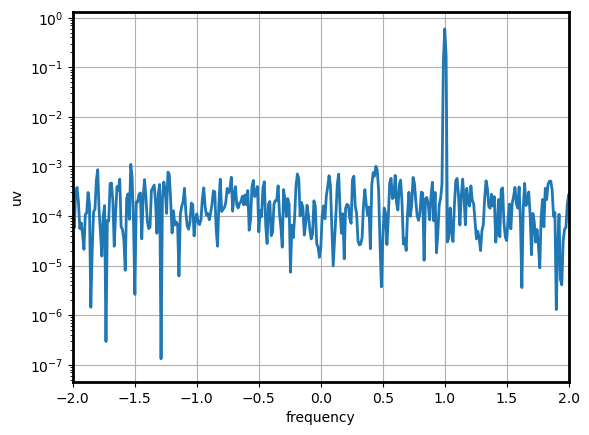
Here compute a global average from the xarray Dataset:
fig, ax = plt.subplots(1, 1)
P_xr["uv"].mean("index").plot(ax=ax, lw=2)
ax.set_yscale("log")
ax.set_xlim(-2, 2)
ax.grid()
denoise/despike time series#
...