Campaign, Deployments, Events objects - demo#
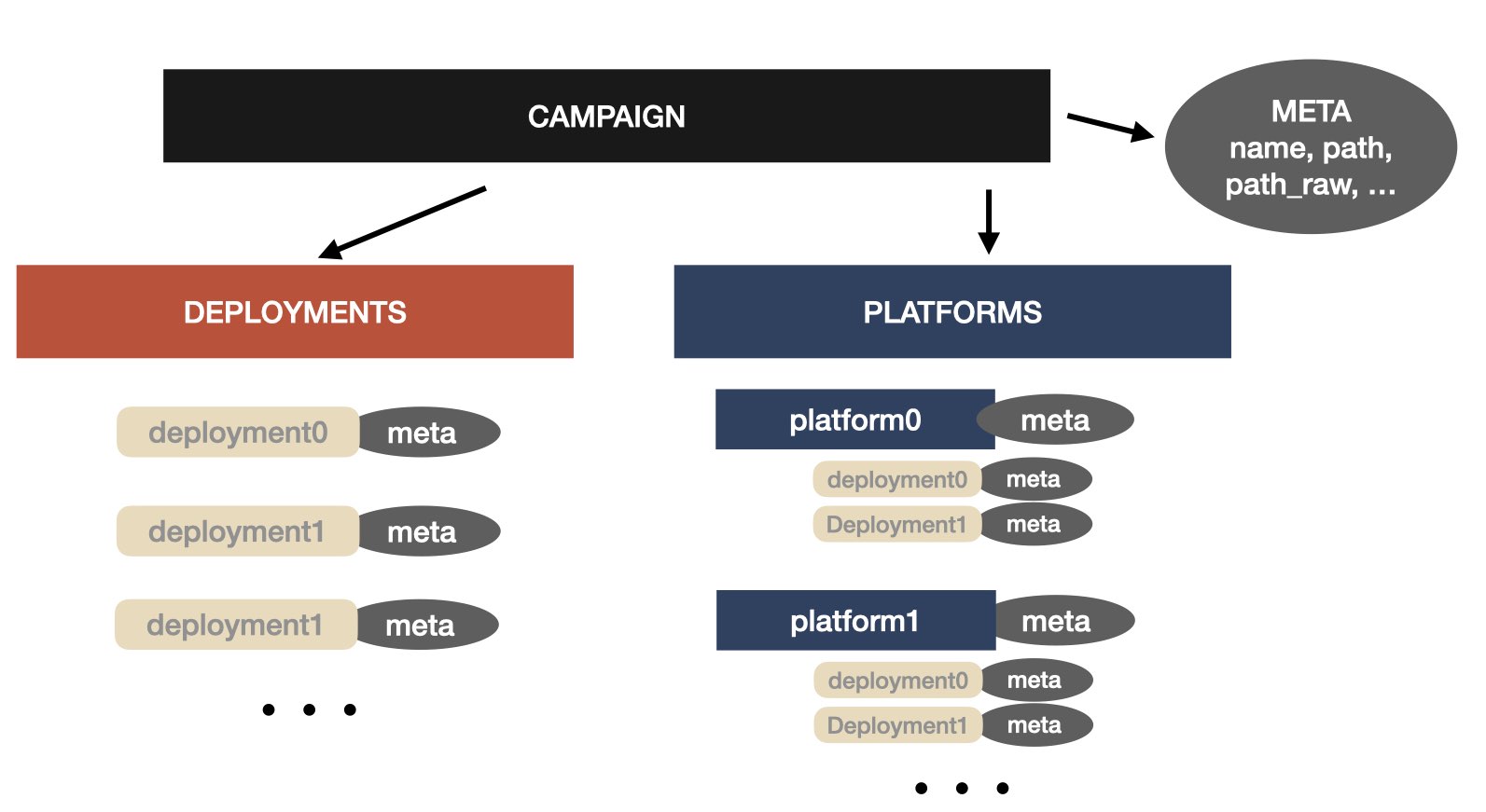
pynsitu.events implements a range of classes (objects) that are useful for the analysis of data relevant to an experimental field campaign, e.g. over a limited time period and an area.
This notebook describes these different classes which are from high to low levels:
Campaign: this is the highest level object relevant to an in situ campaign (e.g. time periods, meta information, deployments, platforms and associated sensors, …). A campaign object is typically loaded from a yaml file (see example). It is composed ofDeploymentsobjects,Platformsinformation and relevant meta data.Platform: a platform object containsDeployments,Sensorsand meta dataDeployments: a collection ofDeploymentswith potential meta data.Deployment: single deployment with temporal and geographical start/end information and meta data.Event: An event is a low-level object describing deployments. It contains four elementary information: label, longitude, latitude, time.
import pynsitu as pin
Campaign#
This is the top most class that describes the campaign. It is loaded from a yaml file:
cp = pin.Campaign("../pynsitu/tests/campaign.yaml")
cp
Campaign(drixmed22 2022/09/21 to 2022/09/25)
Campaign objects contain first relevant meta data:
name: name of the campaignpath: a general path where campaign data is foundpath_raw: path to raw data, may be relative topath(if it does not start with/)path_processed: path to processed data, may be relative topathlon,lat: longitude and latitude boundsstart,end: temporal boundspath to relevant datasets (e.g. bathymetry, coastline, …)
Iterating over a Campaign returns a mix of Deployments and Platform objects:
for i in cp:
    print("label:", i, "; type:", type(cp[i]))
label: underway ; type: <class 'pynsitu.events.Deployment'>
label: tide_gauge ; type: <class 'pynsitu.events.Platform'>
label: europe ; type: <class 'pynsitu.events.Platform'>
label: drix ; type: <class 'pynsitu.events.Platform'>
label: drifter0 ; type: <class 'pynsitu.events.Platform'>
label: drifter1 ; type: <class 'pynsitu.events.Platform'>
label: drifter2 ; type: <class 'pynsitu.events.Platform'>
label: drifter3 ; type: <class 'pynsitu.events.Platform'>
label: drifter4 ; type: <class 'pynsitu.events.Platform'>
label: drifter5 ; type: <class 'pynsitu.events.Platform'>
One can iterate over all Deployment objects contained in the Campaign object:
for label, deployment, platform, sensor, meta in cp.get_all_deployments():
    print("; ".join([label, str(platform), str(sensor), str(deployment)]))
underway; None; None; underway / start 2022-09-21 06:30:00 / end 2022-09-25 15:10:00
laseyne; tide_gauge; None; laseyne / start 2022-09-20 17:48:30 5.89 43.11 / end 2022-09-21 04:50:00 5.89 43.11
fos0; tide_gauge; None; fos0 / start 2022-09-23 19:35:45 4.89 43.39 / end 2022-09-24 11:59:00 4.89 43.39
fos1; tide_gauge; None; fos1 / start 2022-09-24 13:24:30 4.90 43.38 / end 2022-09-24 15:16:00 4.90 43.38
calibration_ligne1; europe; adcp; calibration_ligne1 / start 2022-09-21 08:09:30 / end 2022-09-21 08:31:00
calibration_ligne2; europe; adcp; calibration_ligne2 / start 2022-09-21 08:32:44 / end 2022-09-21 08:52:00
calibration_ligne3; europe; adcp; calibration_ligne3 / start 2022-09-21 08:52:35 / end 2022-09-21 09:10:00
calibration_ligne4; europe; adcp; calibration_ligne4 / start 2022-09-21 09:10:23 / end 2022-09-21 09:26:00
d0; europe; adcp; d0 / start 2022-09-21 18:26:00 / end 2022-09-22 12:42:00
d1; europe; adcp; d1 / start 2022-09-22 20:57:22 / end 2022-09-23 14:16:20
d2; europe; adcp; d2 / start 2022-09-23 15:54:46 / end 2022-09-23 17:28:25
d3; europe; adcp; d3 / start 2022-09-25 05:25:12 / end 2022-09-25 10:55:49
s0_1; europe; ctd; s0_1 / start 2022-09-21 16:40:00 5.07 42.82 / end 2022-09-21 16:45:00 5.07 42.82
s0_2; europe; ctd; s0_2 / start 2022-09-21 22:52:00 4.95 43.23 / end 2022-09-21 22:57:00 4.95 43.23
s0_3; europe; ctd; s0_3 / start 2022-09-21 23:56:00 4.95 43.23 / end 2022-09-22 00:01:00 4.95 43.23
s0_4; europe; ctd; s0_4 / start 2022-09-22 00:53:00 4.82 43.23 / end 2022-09-22 00:58:00 4.82 43.23
s0_5; europe; ctd; s0_5 / start 2022-09-22 01:41:00 4.76 43.23 / end 2022-09-22 01:46:00 4.76 43.23
s0_7; europe; ctd; s0_7 / start 2022-09-22 03:37:00 4.65 43.24 / end 2022-09-22 03:42:00 4.65 43.24
s0_8; europe; ctd; s0_8 / start 2022-09-22 04:24:00 4.59 43.24 / end 2022-09-22 04:29:00 4.59 43.24
s0_9; europe; ctd; s0_9 / start 2022-09-22 05:24:00 4.66 43.26 / end 2022-09-22 05:29:00 4.66 43.26
s0_10; europe; ctd; s0_10 / start 2022-09-22 06:19:00 4.71 43.28 / end 2022-09-22 06:24:00 4.71 43.28
s0_11; europe; ctd; s0_11 / start 2022-09-22 07:08:00 4.78 43.27 / end 2022-09-22 07:13:00 4.78 43.27
s0_12; europe; ctd; s0_12 / start 2022-09-22 07:55:00 4.85 43.27 / end 2022-09-22 08:00:00 4.85 43.27
s0_13; europe; ctd; s0_13 / start 2022-09-22 08:39:00 4.90 43.27 / end 2022-09-22 08:44:00 4.90 43.27
s0_14; europe; ctd; s0_14 / start 2022-09-22 09:15:00 4.95 43.26 / end 2022-09-22 09:20:00 4.95 43.26
s0_15; europe; ctd; s0_15 / start 2022-09-22 09:57:00 4.95 43.31 / end 2022-09-22 10:02:00 4.95 43.31
s0_16; europe; ctd; s0_16 / start 2022-09-22 10:51:00 4.88 43.31 / end 2022-09-22 10:56:00 4.88 43.31
s0_17; europe; ctd; s0_17 / start 2022-09-22 11:35:00 4.82 43.31 / end 2022-09-22 11:40:00 4.82 43.31
s0_18; europe; ctd; s0_18 / start 2022-09-22 12:37:00 4.87 43.32 / end 2022-09-22 12:42:00 4.87 43.32
s1_1; europe; ctd; s1_1 / start 2022-09-23 08:03:10 5.23 43.09 / end 2022-09-23 08:08:00 5.23 43.09
s1_2; europe; ctd; s1_2 / start 2022-09-23 08:36:00 5.21 43.09 / end 2022-09-23 08:41:00 5.21 43.09
s1_3; europe; ctd; s1_3 / start 2022-09-23 09:06:00 5.19 43.10 / end 2022-09-23 09:11:00 5.19 43.10
s1_4; europe; ctd; s1_4 / start 2022-09-23 09:27:00 5.18 43.10 / end 2022-09-23 09:32:00 5.18 43.10
s1_5; europe; ctd; s1_5 / start 2022-09-23 09:53:00 5.17 43.12 / end 2022-09-23 09:58:00 5.17 43.12
s1_6; europe; ctd; s1_6 / start 2022-09-23 10:17:00 5.17 43.13 / end 2022-09-23 10:22:00 5.17 43.13
s1_7; europe; ctd; s1_7 / start 2022-09-23 10:43:00 5.17 43.14 / end 2022-09-23 10:48:00 5.17 43.14
s1_8; europe; ctd; s1_8 / start 2022-09-23 11:12:00 5.16 43.14 / end 2022-09-23 11:17:00 5.16 43.14
s1_9; europe; ctd; s1_9 / start 2022-09-23 11:42:00 5.14 43.15 / end 2022-09-23 11:47:00 5.14 43.15
s1_10; europe; ctd; s1_10 / start 2022-09-23 12:00:00 5.13 43.14 / end 2022-09-23 12:05:00 5.13 43.14
s1_11; europe; ctd; s1_11 / start 2022-09-23 12:25:00 5.11 43.15 / end 2022-09-23 12:30:00 5.11 43.15
s1_12; europe; ctd; s1_12 / start 2022-09-23 12:56:00 5.11 43.14 / end 2022-09-23 13:01:00 5.11 43.14
s1_13; europe; ctd; s1_13 / start 2022-09-23 13:32:00 5.10 43.16 / end 2022-09-23 13:37:00 5.10 43.16
s1_14; europe; ctd; s1_14 / start 2022-09-23 14:02:00 5.08 43.18 / end 2022-09-23 14:07:00 5.08 43.18
calibration_ligne1; drix; adcp; calibration_ligne1 / start 2022-09-21 08:15:14 / end 2022-09-21 08:31:05
calibration_ligne2; drix; adcp; calibration_ligne2 / start 2022-09-21 08:35:09 / end 2022-09-21 08:51:05
calibration_ligne3; drix; adcp; calibration_ligne3 / start 2022-09-21 08:53:36 / end 2022-09-21 09:09:08
calibration_ligne4; drix; adcp; calibration_ligne4 / start 2022-09-21 09:10:25 / end 2022-09-21 09:25:17
d0; drix; adcp; d0 / start 2022-09-21 09:30:00 / end 2022-09-22 13:55:00
d1; drix; adcp; d1 / start 2022-09-22 18:20:00 / end 2022-09-24 15:00:00
d2; drix; adcp; d2 / start 2022-09-25 04:42:00 / end 2022-09-25 14:20:00
s0_1; drix; ctd; s0_1 / start 2022-09-21 17:08:59 / end 2022-09-21 17:13:00
s1_1; drix; ctd; s1_1 / start 2022-09-23 09:28:12 / end 2022-09-23 09:29:12
s1_2; drix; ctd; s1_2 / start 2022-09-23 11:13:00 / end 2022-09-23 11:14:00
s1_3; drix; ctd; s1_3 / start 2022-09-23 11:44:00 / end 2022-09-23 11:45:00
s1_4; drix; ctd; s1_4 / start 2022-09-23 12:01:00 / end 2022-09-23 12:02:00
s1_5; drix; ctd; s1_5 / start 2022-09-23 12:25:30 / end 2022-09-23 12:26:30
s1_6; drix; ctd; s1_6 / start 2022-09-23 12:57:00 / end 2022-09-23 12:58:00
s1_7; drix; ctd; s1_7 / start 2022-09-23 13:33:00 / end 2022-09-23 13:34:00
d0; drifter0; None; d0 / start 2022-09-23 06:05:00 5.25 43.07 / end 2022-09-23 14:25:00 5.06 43.19
d0; drifter1; None; d0 / start 2022-09-23 06:19:01 5.23 43.07 / end 2022-09-23 14:57:12 5.05 43.18
d0; drifter2; None; d0 / start 2022-09-23 06:40:00 5.25 43.07 / end 2022-09-23 15:52:42 5.03 43.17
d0; drifter3; None; d0 / start 2022-09-23 06:50:00 5.22 43.06 / end 2022-09-23 15:42:10 5.03 43.17
d0; drifter4; None; d0 / start 2022-09-23 07:10:00 5.23 43.07 / end 2022-09-23 15:12:14 5.06 43.18
d0; drifter5; None; d0 / start 2022-09-23 07:22:55 5.23 43.08 / end 2022-09-23 15:19:00 5.06 43.18
Select a Deployment within the list of top level deployments:
cp["underway"]
Deployment(underway / start 2022-09-21 06:30:00 / end 2022-09-25 15:10:00)
Loop over available platforms:
for label, p in cp.platforms.items():
    print(label, p)
tide_gauge Platform tide_gauge
 general deployments: laseyne / fos0 / fos1

europe Platform europe
 sensors: adcp / ctd

drix Platform drix
 sensors: adcp / ctd

drifter0 Platform drifter0
 general deployments: d0

drifter1 Platform drifter1
 general deployments: d0

drifter2 Platform drifter2
 general deployments: d0

drifter3 Platform drifter3
 general deployments: d0

drifter4 Platform drifter4
 general deployments: d0

drifter5 Platform drifter5
 general deployments: d0
Inspect one platform and its meta data:
print(cp["drix"])
print(cp["drix"]["meta"])
Platform drix
 sensors: adcp / ctd

{'label': 'drix', 'color': 'crimson'}
You can access meta data directly:
cp["drix"]["color"]
'crimson'
Loop over all sensors of a Platform:
for s in cp["drix"].sensors():
    print(s)
adcp
ctd
Note: you can access sensor Deployments object with cp["drix"][s]
A Sensor is described by a Deployments collection:
cp["drix"]["adcp"]
Deployments(adcp
calibration_ligne1
calibration_ligne2
calibration_ligne3
calibration_ligne4
d0
d1
d2)
Loop over all sensor Deployments:
for label, d in cp["europe"]["adcp"].items():
    print(label, ":", d)
calibration_ligne1 : calibration_ligne1 / start 2022-09-21 08:09:30 / end 2022-09-21 08:31:00
calibration_ligne2 : calibration_ligne2 / start 2022-09-21 08:32:44 / end 2022-09-21 08:52:00
calibration_ligne3 : calibration_ligne3 / start 2022-09-21 08:52:35 / end 2022-09-21 09:10:00
calibration_ligne4 : calibration_ligne4 / start 2022-09-21 09:10:23 / end 2022-09-21 09:26:00
d0 : d0 / start 2022-09-21 18:26:00 / end 2022-09-22 12:42:00
d1 : d1 / start 2022-09-22 20:57:22 / end 2022-09-23 14:16:20
d2 : d2 / start 2022-09-23 15:54:46 / end 2022-09-23 17:28:25
d3 : d3 / start 2022-09-25 05:25:12 / end 2022-09-25 10:55:49
Select a single Deployment
cp["europe"]["adcp"]["d0"]
Deployment(d0 / start 2022-09-21 18:26:00 / end 2022-09-22 12:42:00)
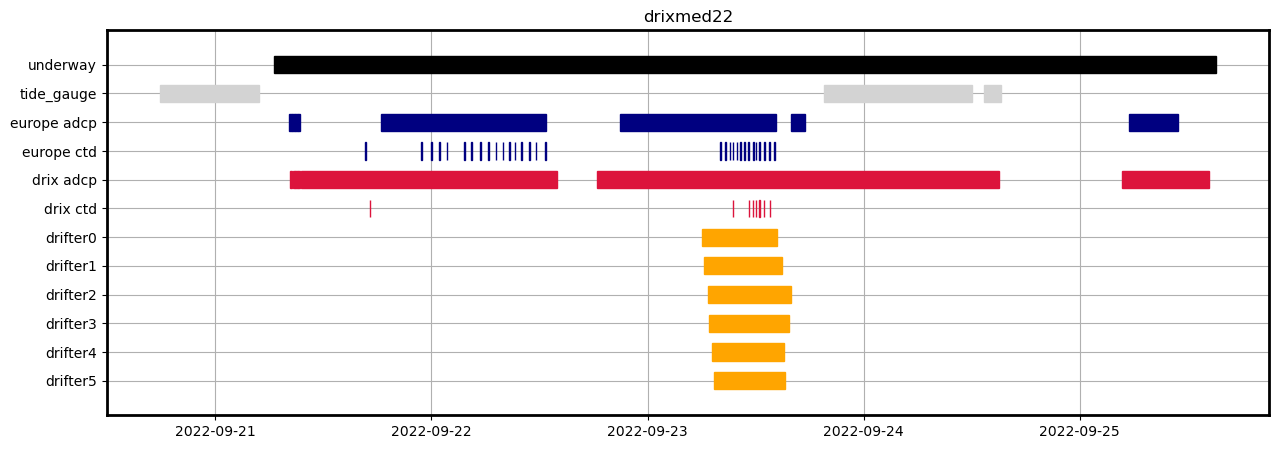
show Campaign timeline#
Note that options are available to turn on/off some information displays
cp.timeline()
<Axes: title={'center': 'drixmed22'}>
make maps#
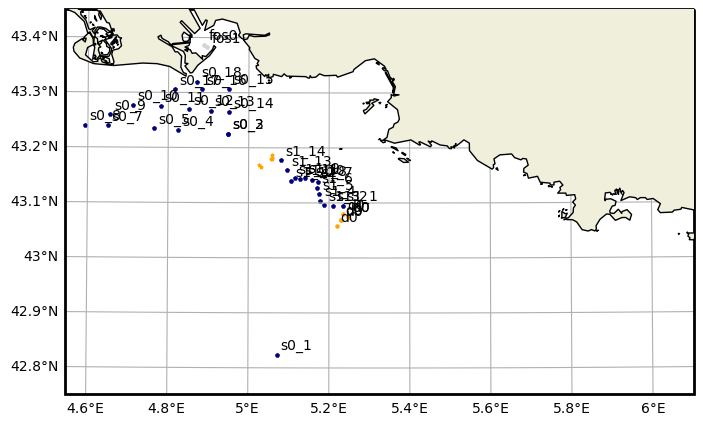
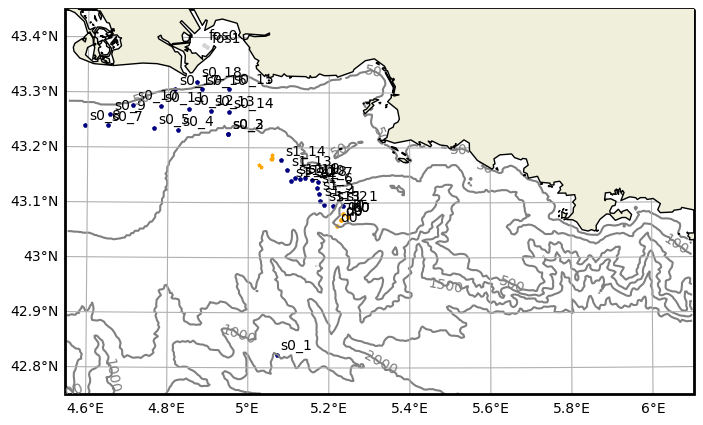
The campaign object is linked to geographical objects and mapping methods (see XXX link to map doc XXX)
Link to bathymetric datasets:
The local path to any dataset used by pynsitu should be specied in the ~/.config/pynsitu/pynsitu.yaml file.
with cartopy#
without bathymetry:
fig, ax, cbar = cp.map(bathy=False, coastline="h")  # bathy_fill=False,

# add all deployments
for label, deployment, platform, sensor, meta in cp.get_all_deployments():
    if "color" in meta:
        c = meta["color"] if "color" in meta else "0.5"
    deployment.plot_on_map(ax, color=c, label=True, label_xyshift=(0.01, 0.01))
with bathymetric file (see pynsitu/tests/campaign.yaml)
fig, ax, cbar = cp.map(bathy_fill=False, coastline="h")

# add all deployments
for label, deployment, platform, sensor, meta in cp.get_all_deployments():
    if "color" in meta:
        c = meta["color"] if "color" in meta else "0.5"
    deployment.plot_on_map(ax, color=c, label=True, label_xyshift=(0.01, 0.01))
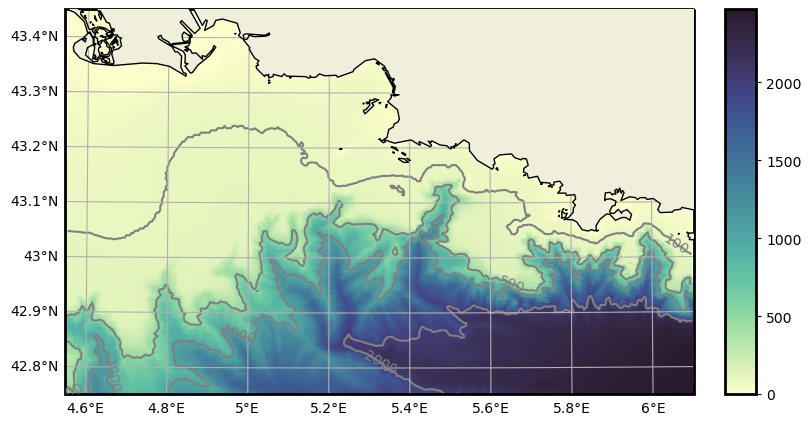
varition with colors:
cp.map(coastline="h", bathy_levels=[0, 100, 500, 1000, 2000], bathy_fill=True);
with folium#
See
cp.map_folium()